AI Foundry. Covers Fri 9 Oct 2026 (week 41), your visit to the lab, mainly 14:55–15:40 PDT. Written Wed 14 Oct 2026 (week 42), 11:00–12:30 PDT, on the Intel (~/git0/gyroscope), on your ask: summarise Friday, rebuild the dimensions from the photos you took for the thermal camera, and link the page from the other thermal pages. Built from your 45 phone photos of 14:55–15:37, read at full resolution, your check-ins, the lab repo's fan-swap record, the dev card's drawing, the board's manual and the camera's manual. Part of the thermal camera hub.
The numbers
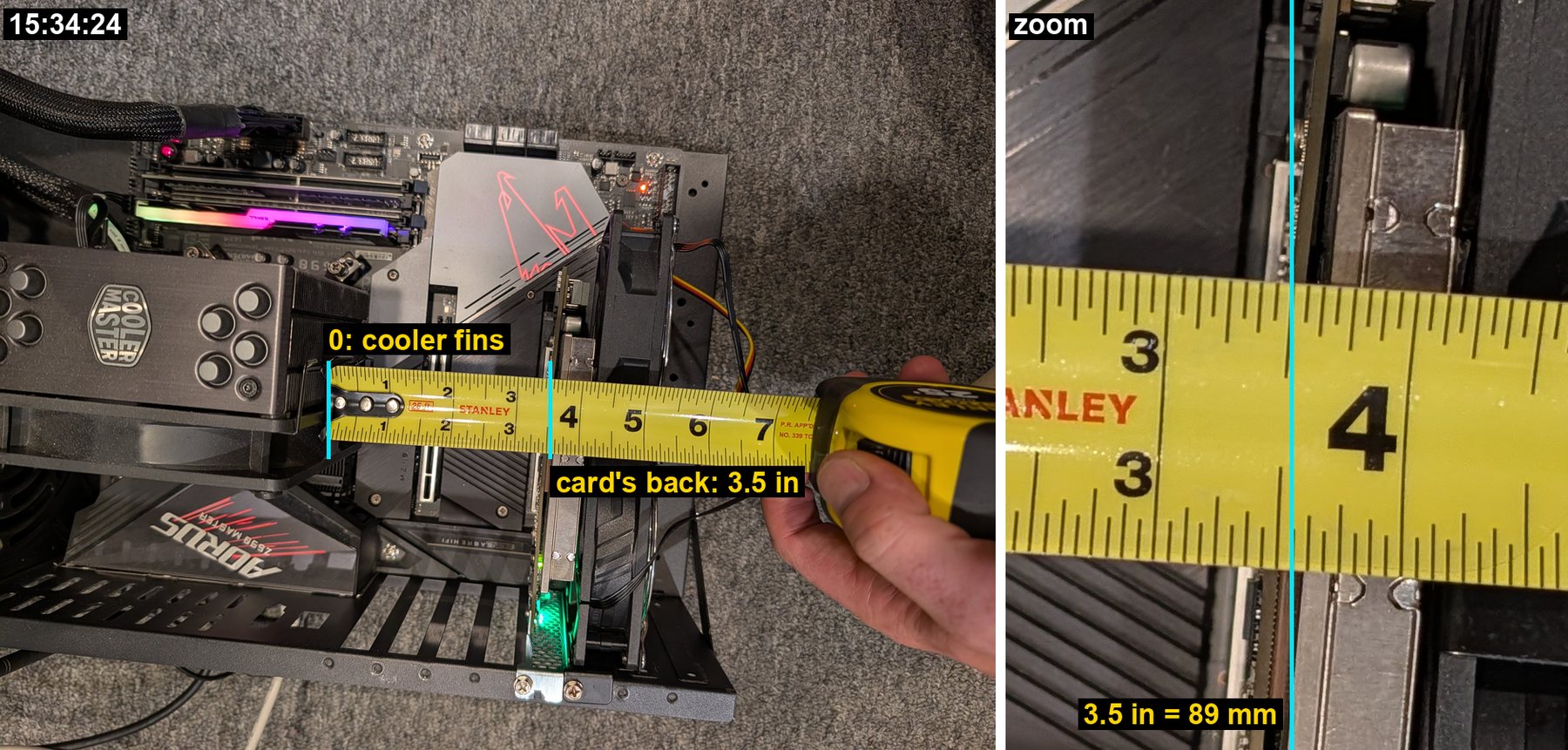
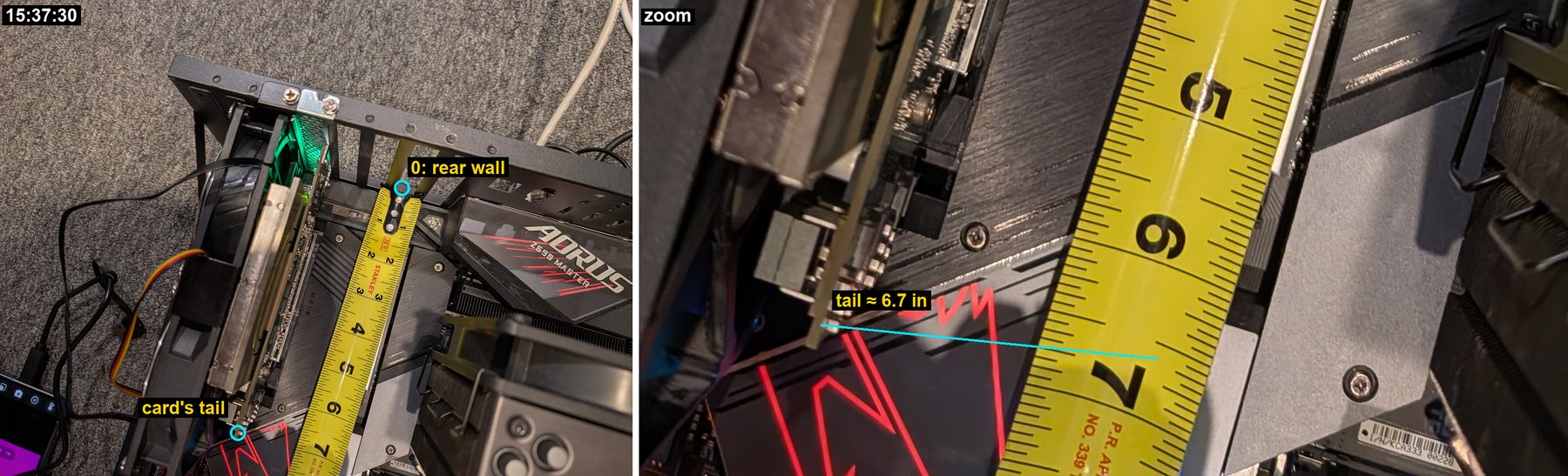
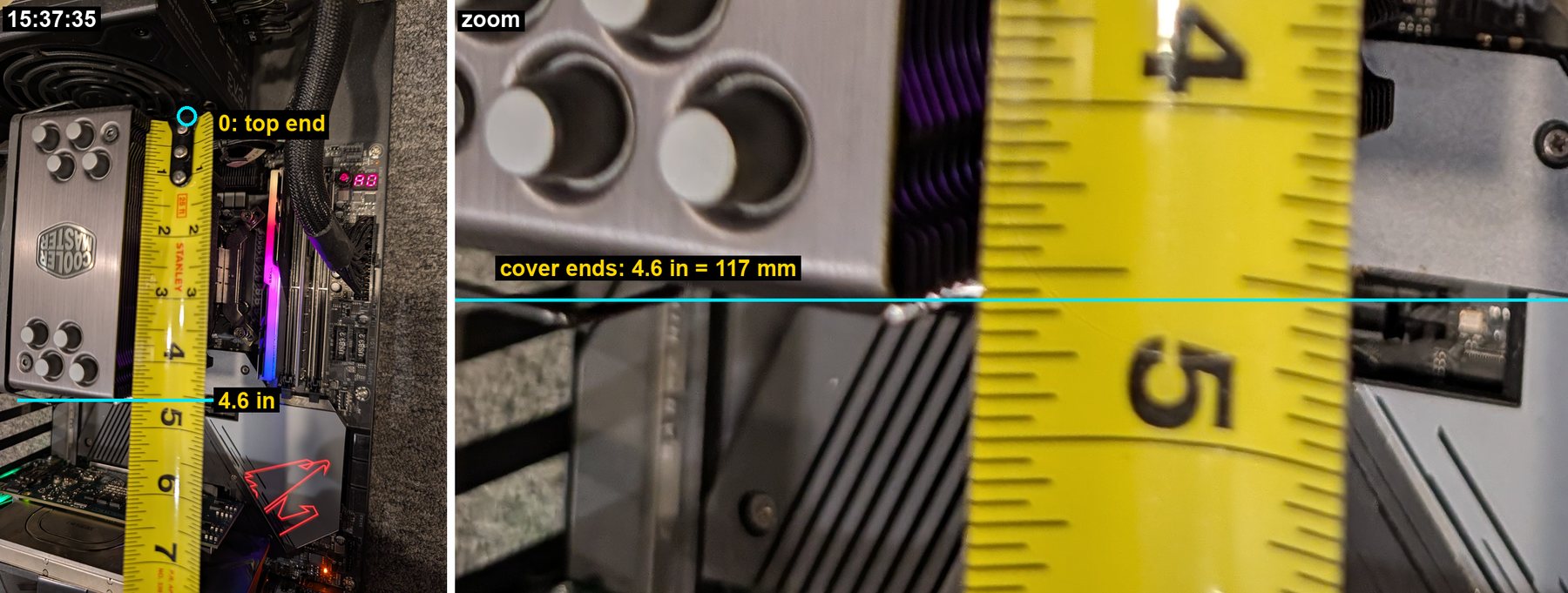
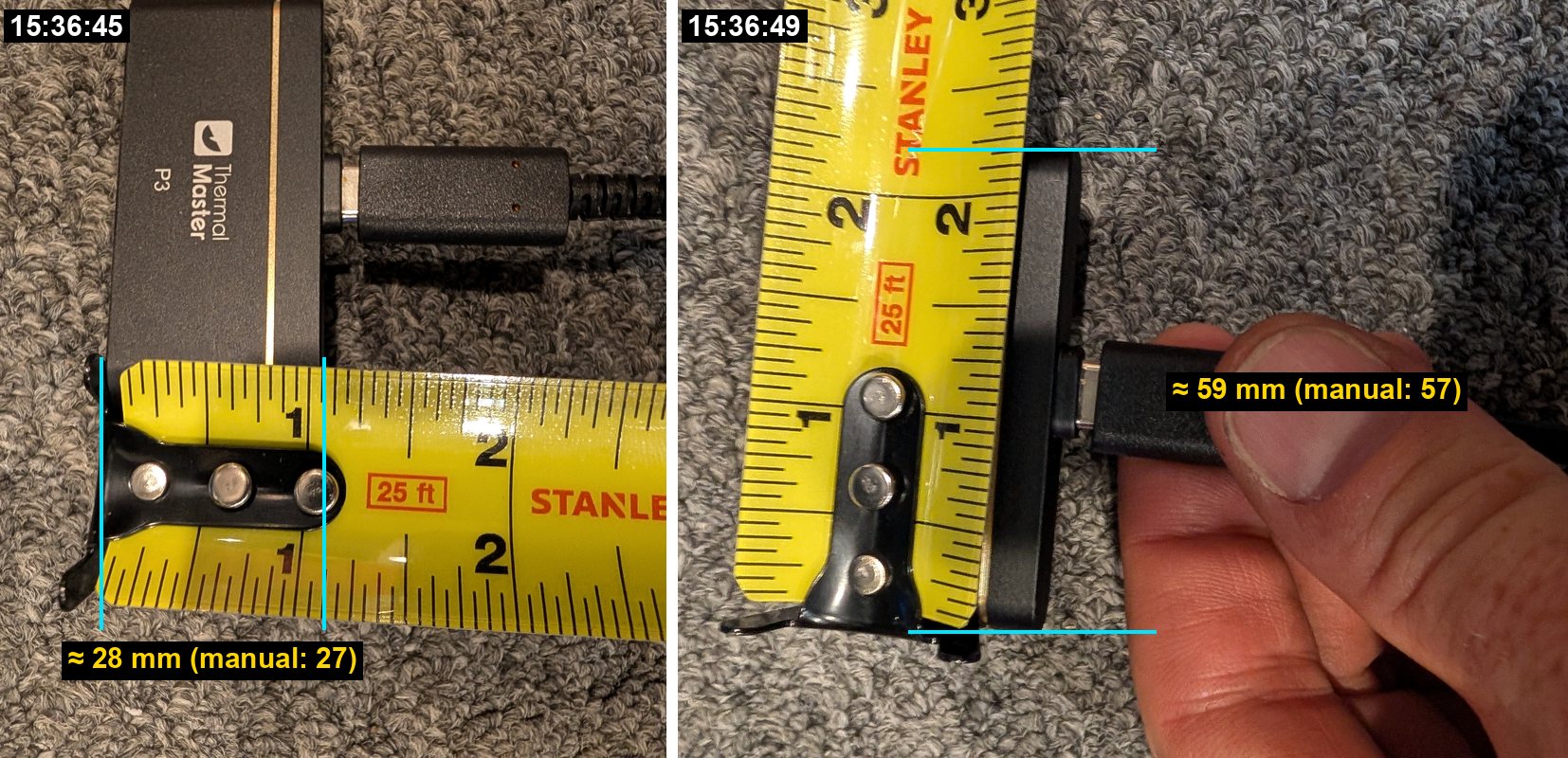
On Friday you swapped aifoundry2's failing card fan for a two-fan bracket, then spent 15:34–15:37 measuring the space behind the card with a Stanley measure and photographing the machine from every side. Ten of those 32 photos show the measure. Six can be read to a millimetre or two, and the camera itself is the check on the method.
| What | Reading | Photo | How sure |
|---|---|---|---|
| Card's back to the CPU cooler's fins | 3.5 in, 89 mm | 15:34:24 | ±2 mm. The hub first read 3⅓ in (85 mm) from a reduced copy |
| Card's length, rear wall to tail | 6.6–6.7 in, 168–171 mm | 15:37:30 | The PCIe half length, 167.65 mm |
| CPU cooler's top cover, along the board | 4.6 in, 117 mm | 15:37:35 | A Cooler Master Hyper 212 Black Edition |
| The P3, width and length | 28 × 59 mm | 15:36:45, 15:36:49 | Its manual says 27 × 57 mm, reviews say 59 long |
| The open frame, power-supply end to slot end | 16.9 in, 430 mm | 15:34:12 | ±0.3 in; the board's edge reads 16.0 in on the same pull |
| The card's slot | position 5 of 7, PCIEX8 | 15:37:54 | The empty PCIEX16 is position 2, 61 mm nearer the CPU |
| The card's board height | about 69 mm (low profile), not taped | 15:37:48, 15:34:33 | Likely: the heatsink and shroud stand higher than the board |
| The frame's label | mv-swpcie50 | 15:37:46 | It ties aifoundry2 to the lab's labels |
What it means for the camera:
- The P3 fits behind the card with room to spare. It is 17.2 mm deep, so in the 89 mm gap its lens can sit anywhere from touching the board to about 70 mm away, where its back would touch the fins.
- The 7–8 cm design point from the 9 Oct research does not fit. The hub's 60–65 mm does, with 7–12 mm of air left between the camera and the fins.
- At 60 mm the P3 sees 40 × 30 mm. That holds the die's 26 × 22 mm footprint with a margin. The whole 45 mm package never fits from inside the gap: at the farthest point, 70 mm, the view is 47 × 35 mm. That costs little, since the board blurs the heat over centimetres anyway.
- Aim about 42 mm above the motherboard and about 86 mm in from the rear wall. If the board is low profile, its 45 mm package can only be centred 34–49 mm up, most likely about 42. A full-height dev card would put it at 57 mm.
- Anchor it on the rear wall's open slot positions. A blank bracket screwed into position 2 puts the camera's centre on that slot's line, with the lens about 52 mm from the board. An arm offset 8–13 mm toward the cooler brings it to 60–65 mm. Position 1 leaves the camera touching the fins. Position 3 gives 31 mm and a 19 × 14 mm view, and position 4 is too close to the card.
How far the lens can sit, by the thin-lens model the hub uses:
| Lens to board | Field | Per pixel | Holds | Air behind the camera |
|---|---|---|---|---|
| 31 mm (bracket in slot 3) | 19 × 14 mm | 0.07 mm | the middle of the die | 41 mm |
| 52 mm (bracket in slot 2) | 34 × 26 mm | 0.13 mm | the die's footprint | 20 mm |
| 60 mm | 40 × 30 mm | 0.16 mm | the die and the capacitors around it | 12 mm |
| 65 mm | 43 × 33 mm | 0.17 mm | most of the package | 7 mm |
| 70 mm | 47 × 35 mm | 0.18 mm | the package's full width | 2 mm: touching the fins |
Friday, in order
| Time (PDT) | What happened |
|---|---|
| 12:16 | Your first P3 capture of a card's back, posted in #community-lab at 14:02: the chip's footprint through the board, in one frame |
| 12:47 | A photo of the Cooler Master SickleFlow 92, the fan that later went into the new bracket |
| 14:55 | aifoundry2 shut down as root (your note) |
| 14:56 | A photo of where the lab's toolkit is kept (your note) |
| 15:04 | Your note: replacing a fan "with a different fan which has a longer cable" |
| 14:55–15:24 | The fan swap: the stalling 120 mm fan under the card out, a two-fan 92 mm slot bracket in the slot beside it (position 6), one fan swapped for the SickleFlow. Booted at 15:07 without fans: the die heated from 44 to 87 °C in nine minutes. With them, 51 °C idle at 23 W by 15:24 |
| 15:18 | Your note: "I use the reverse order when I put it in" |
| 15:29 | A photo of the drawer of spare fans: Thermalright TL-8015 (80 mm) and TL-C12CW (120 mm) boxes |
| 15:33 | Your note: "I placed the board backwards for easier fan maintenance" |
| 15:34–15:37 | The measurements on this page: 32 photos, 10 with the measure, the P3 hung in the gap, and the machine from every side |
| 15:35 | The P3's live view of the capacitor field behind the chip, 36.4–42.1 °C, and your note: "Took a picture of approximate smallest distance" |
| 15:36–16:01 | The burst test and the heavy run on the new fans: 62–63 °C plateau, then 75 °C under full load (fan swap page) |
| 16:29–20:45 | Later that day: the thermal camera hub, then cooling from the back, camera on top, both built from these photos |
The photos, one by one
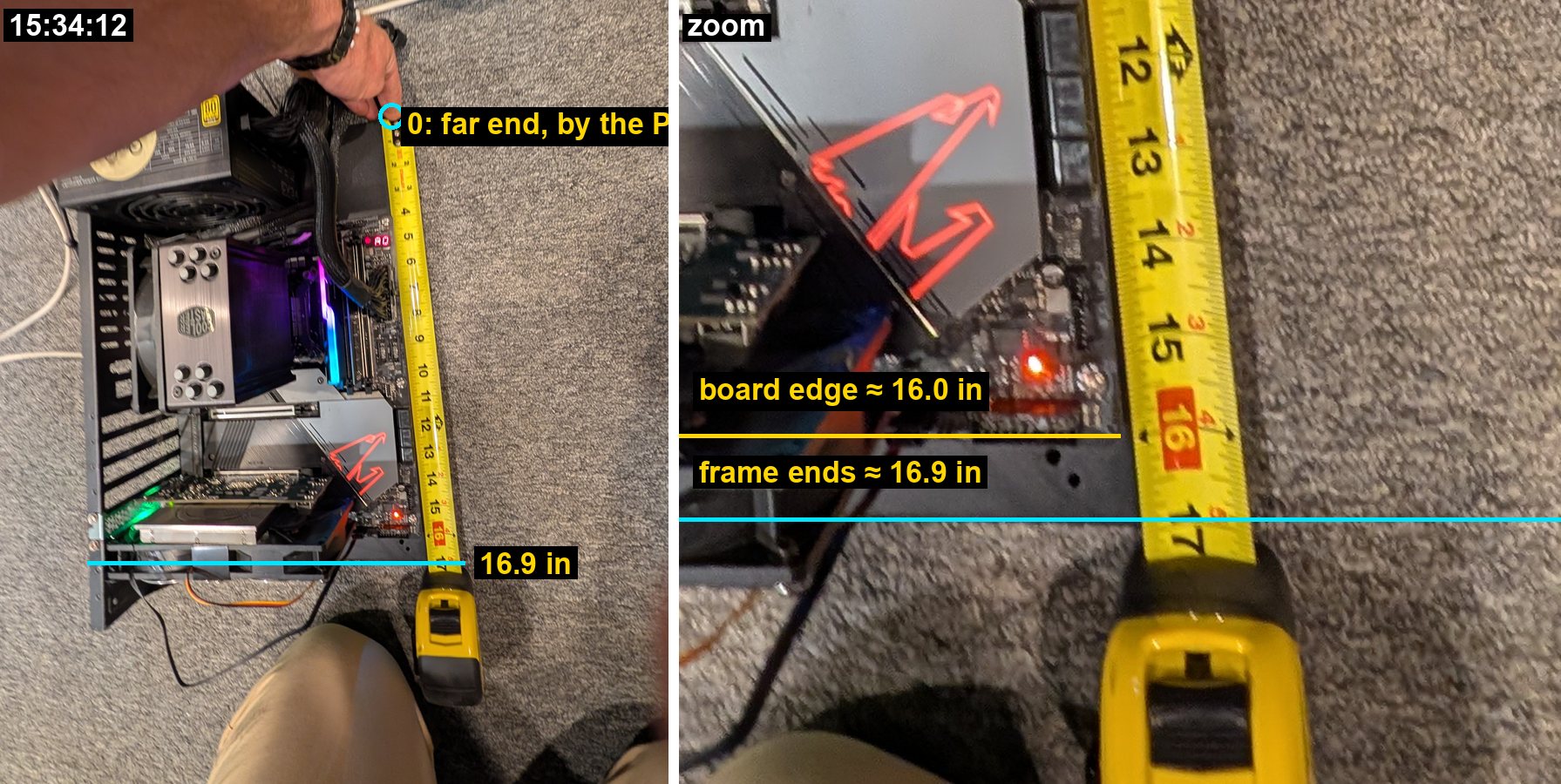
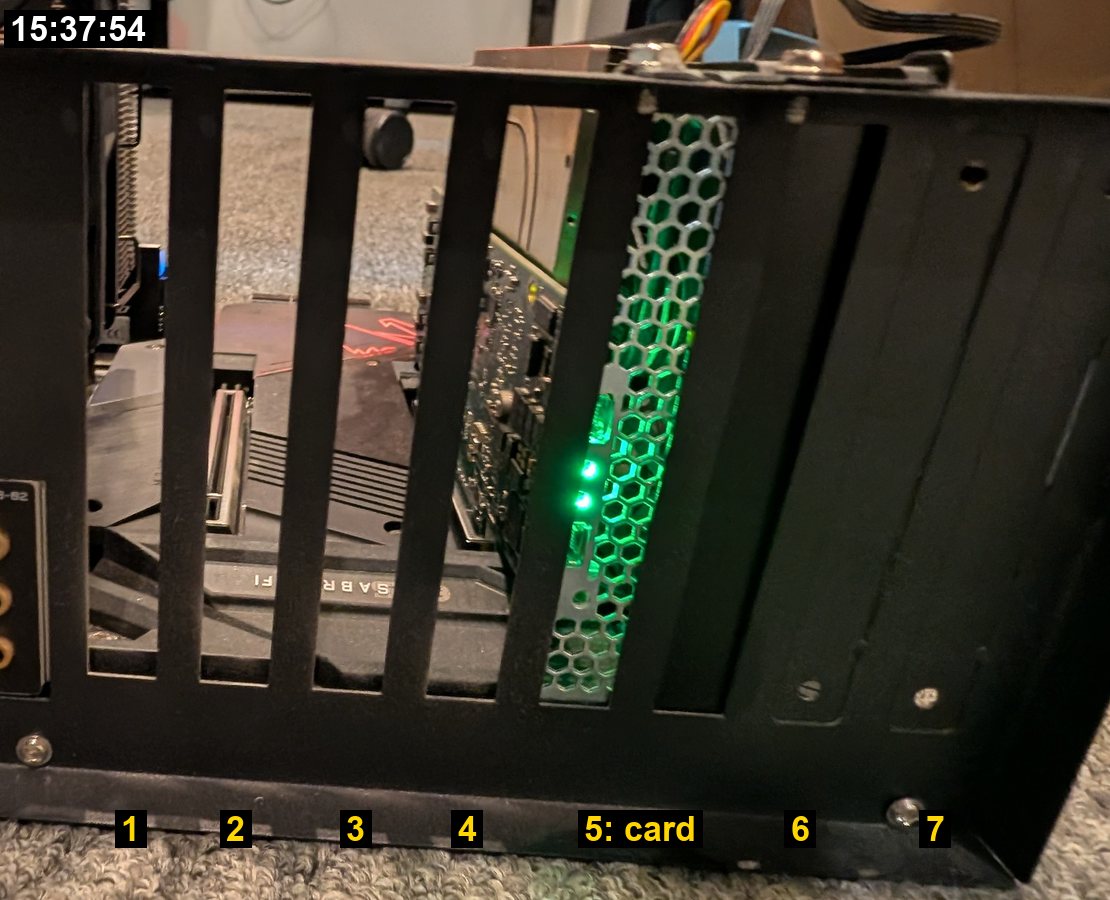
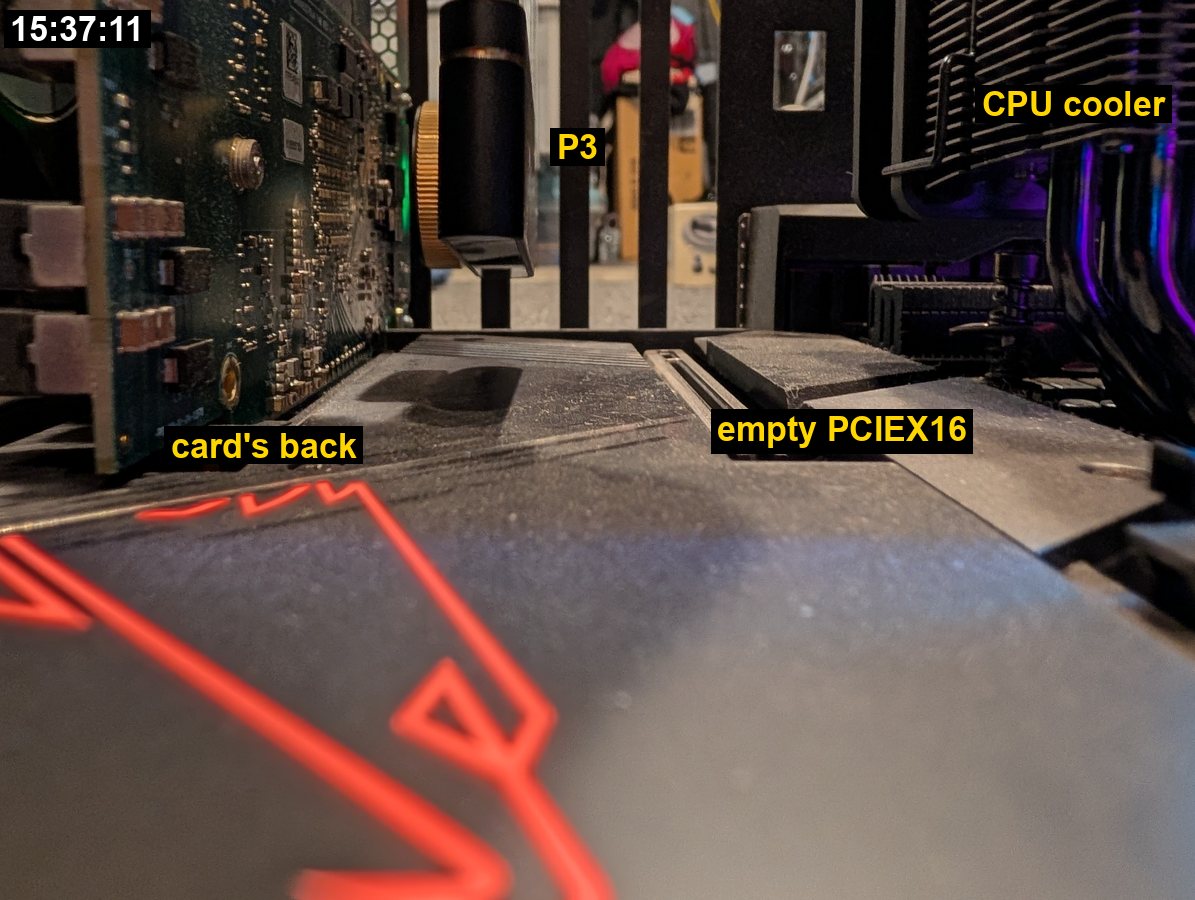
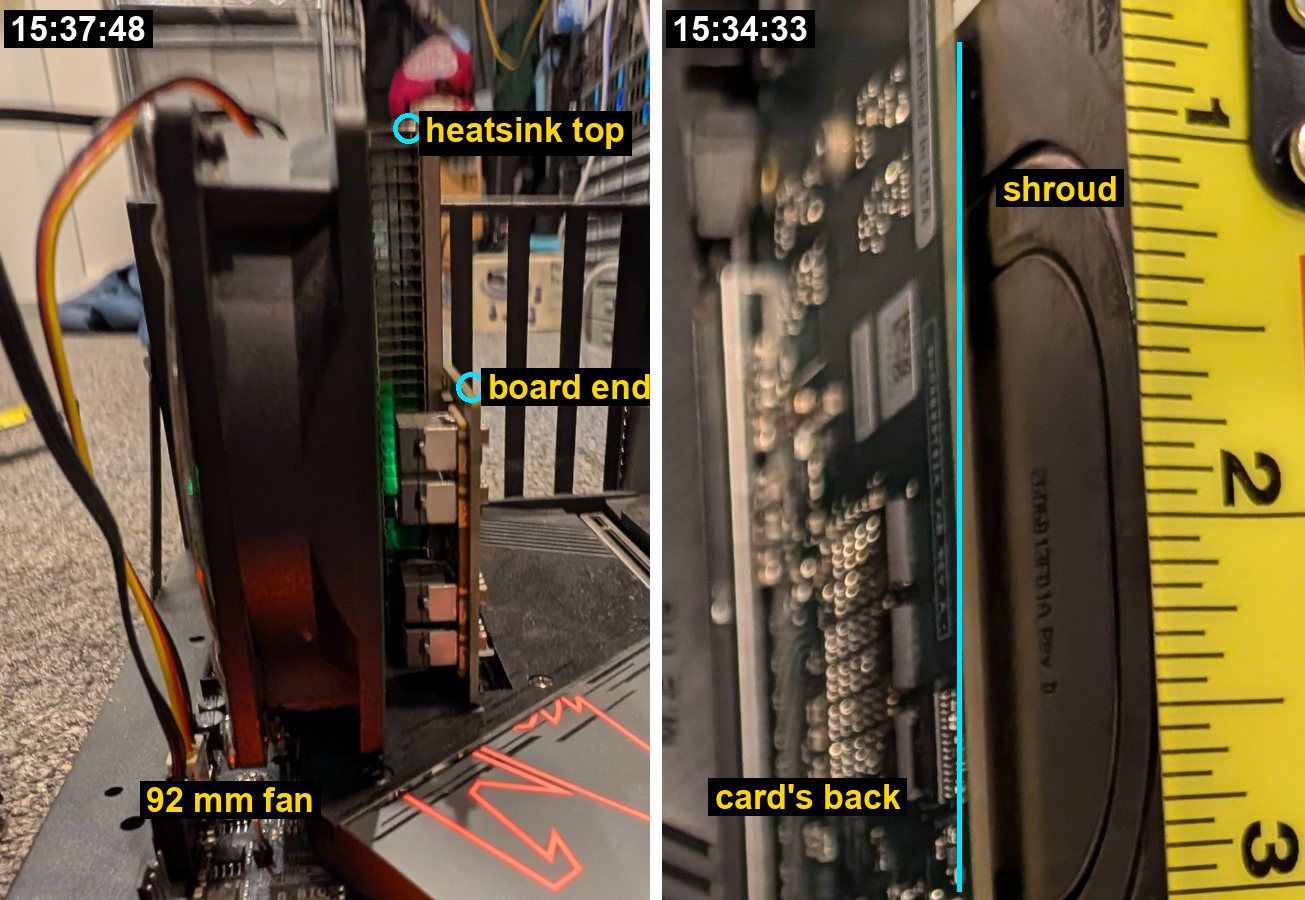

What Friday settled
From the 26 Sep plan's blocking questions:
- Which labelled rig is which? aifoundry2's frame reads mv-swpcie50.
- Which face is reachable, and how far? The back, facing the CPU cooler, 89 mm. The plan called this the single fact that decides the mount.
- Is a fan fitted? Yes, since 15:17: a two-fan 92 mm slot bracket on the heatsink side. Whether the heatsink covers the DRAM can't be seen.
- Which board revision? Most likely the low-profile production board (the 15:37:48 photo above). That moves the chip's centre to about 42 mm above the motherboard.
- Chassis or open frame? An open frame. Since the swap it stands on the floor, with nothing above the gap.
From the 9 Oct research's day-one list: item 3 is half done. The card's back to the cooler is measured. There is no shelf above, since the frame sits on the floor. The bracket screw to the chip's centre is not taped; it is estimated here at about 86 mm, from the dev card's drawing and the capacitor field's place in the 15:34:33 photo. The other seven items, from the ruler in the camera's view to the warm-up drift, need the camera running in place.
From the rear-cooling page's on-site list: there is no backplate. Behind the chip itself the photos show only small capacitors, the cold dots of the 15:35 live view. Two brass screw heads show on the back; their spacing, the board's thickness and the lid's height were not measured.
An ad hoc mount for Fri 16 Oct
Added Wed 14 Oct 2026, about 15:15, on your ask for something cheap, adjustable, and arriving before Friday noon.
The idea: hold the P3 on a bendable arm that reaches into the gap from above, or in from the board's front edge, with the lens facing the card's back. Hold it at two points, the body and the cable, so it can't swing or hang from its plug. Keep all bare metal away from the board and the card.
1. Order today: a helping-hands stand (a soldering "third hand"). It has a weighted steel base, four metal gooseneck arms and alligator clips. The KOTTO 4-arm set is $29.99 at Target, and Amazon has many like it. Versions whose arms have magnetic feet (QuadHands, Weller WLACCHHM-02, about $55–80) stick straight onto the steel frame, so the camera moves with the card.
- One clip holds the P3's body at the end away from the lens. Sleeve its teeth with heat-shrink or a dab of putty so they don't mark it.
- A second clip holds the cable 3–5 cm behind the plug, which takes the strain off the plug and stops the swing.
- The base sits on the floor beside the frame. The arms come in from above, or from the board's front edge past the card's tail.
- With the Weller WLACCHHM-02 (6 × 9 in steel base, about 1.5 kg; arms 2 × 8.5 in and 2 × 12.5 in; coated clips), the two 12.5-inch arms do the work, one on the camera and one on the cable.
- Set the base at the board's front edge, raised on a box or a book so its plate sits about level with the motherboard. The camera point is then about 16 cm in and 4 cm up: about 20–23 cm of arm, so a 12.5-inch arm has about 10 cm to spare. Turn the base so the long arms' roots are on the side nearest the rig; 6–9 inches of base between them and the rig would use up that spare.
- The arms never have to come off the base. If they do lift off and a magnet sticks to the frame's rear wall, an 8.5-inch arm stuck there reaches the same point from behind: about 9 cm in and 8 cm down.
- The way in, from the board's front edge: over the chipset cover and the SATA ports, then between the card and the cooler, about 7 cm from the card's back. Keep the arm above the memory sticks, which stand about 4.5 cm tall.
2. From any hardware store: your coat hanger, made safe.
- Use insulated solid copper house wire (10 or 12 gauge, sold by the foot) or a plastic-coated hanger. A bare steel hanger can short the board if it slips, so sleeve one first. Two strands twisted together hold their shape better.
- Anchor it to the frame: zip-tie it through two of the open slot positions in the rear wall (1–4 are open), or hook it over the wall's top edge.
- Run it in along the card at the camera's height and bend the last few centimetres toward the card. Fix the P3 with a hook-and-loop dot plus a zip tie around its body, clear of the lens.
- Putty only fills gaps and damps vibration. On its own it creeps, more so in warm air.
3. The stiffest: Loc-Line 1/4-inch hose (kit 40413, about $12–22). Its plastic segments snap together, hold their shape, and can't short anything. Zip-tie the base to the frame, keep the arm under 15 cm, and zip-tie the P3 to the end.
Where to set it (the drawings above, and the focus simulator to drag it around): lens 55–65 mm from the card's back and square to it, its axis about 42 mm above the motherboard (57 if the board turns out to be full height), about 86 mm in from the rear wall. Centre the hot patch in the live view, focus, then lock the ring with a strip of Kapton. Tap the frame: if the picture jumps, add the second hold.
Also bring: zip ties, hook-and-loop dots, mounting putty (Fun-Tak or Blu-Tack), heat-shrink for any bare metal, the P3's 50 cm USB-C extension and the 1-mil Kapton. For the calibration: a roll of black electrical vinyl, a square of aluminium foil on cardboard, and the contact sensor if it arrives. It's the lab's frame, so tell Roman before fixing anything to it.
Next visit: ten minutes with the measure
- The board's height at the tail, from the motherboard. About 72 mm means low profile and about 114 mm full height. Everything about the aim follows from it.
- The centre of the capacitor field behind the chip: its distance in from the rear wall and its height above the motherboard. This is the aim point.
- The two brass screws: centre to centre, and whether they hold the heatsink.
- The lowest fin of the CPU cooler above the motherboard, to see whether the camera can tuck under the fins.
- A ruler in the P3's view at 5 and 6 cm, square to the lens, and its close-focus stop. That checks the table above against the real lens.
- One square-on photo of the card's back with the measure in the board's plane. It turns the photo into a map of the parts behind the chip.
Sources, and how this page was built
- Your photos, Fri 9 Oct,
Dropbox/photos(Pixel 10 Pro XL): 14:55–15:37, 45 of them, each read at full resolution (4080 × 3072). Main-camera shots were preferred for numbers, and ultrawide ones were used only where the measure lies flat on the object. The figures here are crops with EXIF and location removed. The 15:40 photos are left out. - Your check-ins of 14:55, 14:56, 15:04, 15:18, 15:33 and 15:35 (
recent_checkins --date 2026-10-09). - The lab repo et-soc1-prototyping:
docs/reports/data/2026-10-09-fan-swap-aifoundry2/README.md(the swap, the bracket's fans, the temperatures) anddocs/findings/14-card-behaviour.md(the board's model). - The card:
ET-PCIe-Dev-Card-V3.pdffromaifoundry-org/et-man, p.3 (6.6 × 4.4 in, the package's place). The production board's 167.65 × 68.9 mm is from the 26 Sep plan's reading of corsix.org's photos. - The motherboard: Gigabyte Z590 AORUS MASTER manual rev 1002, p.6 layout, which is drawn to scale (mirror). It puts PCIEX16 in position 2, PCIEX8 in 5 and PCIEX4 in 7, and the socket about 90 mm below the top edge (±5 mm). From that, the gap would be about 94 mm, against 89 measured, within the drawing's tolerance. The ATX 2.2 spec gives the slot pitch, 0.800 in. The PCI Express CEM spec gives the connector height (11.25 mm), the card-edge depth (8.40 mm) and the card outlines (111.15 / 68.90 × 167.65 mm).
- The cooler: Hyper 212 Black Edition, 123 × 77 × 158.8 mm with its 120 mm fan. The fans: SickleFlow 92, 92 × 92 × 25 mm. The Pano-Mounts bracket has no published drawing.
- The camera: the P3 manual's comparison table (57 × 27 × 17.2 mm; 40° × 30.2°; 256 × 192 at 12 µm; f = 4.3 mm). Reviews at IT Connect and TechRadar give 59 × 27 × 17.2 mm. The field sizes use the hub's thin-lens model.
- Scripts: on the Intel in
~/git0/aifoundry/work/friday-thermal-measurements/:figs.pymakes the annotated crops from the full-resolution photos, andrig_svg.pydraws the two views, with every number in one place. Change a number there and rerun it to redraw.
Total life satisfaction: the thermal model is one of the three goals at the top of your Project doc. Friday turned "will the camera fit?" into a drawing with numbers on it. What's left is a ten-minute check with the measure and a printed bracket in slot 2.